Sound into light
Live audio‑reactive visuals for macOS
Visuals that move with your music, for a live set, a stream or the track you are working on. Feed it your Mac's microphone, an audio interface or a track in Ableton Live or Logic Pro, pick a look and hit Ready. No controller needed.
$19.99 once on the Mac App Store, no subscription.
Needs macOS 14 or later.
Visuals that move with your music
Real-time, audio-reactive scenes rendered in Metal. Beat-synced, low-latency, and built to fill a screen behind your set.
Live previews, running right here in your browser. In the app they render in Metal and react to your own audio.
Everything on one screen
No menus to dig through. Pick an input, choose a look, dial the knobs, and hit Ready. This is the whole interface.
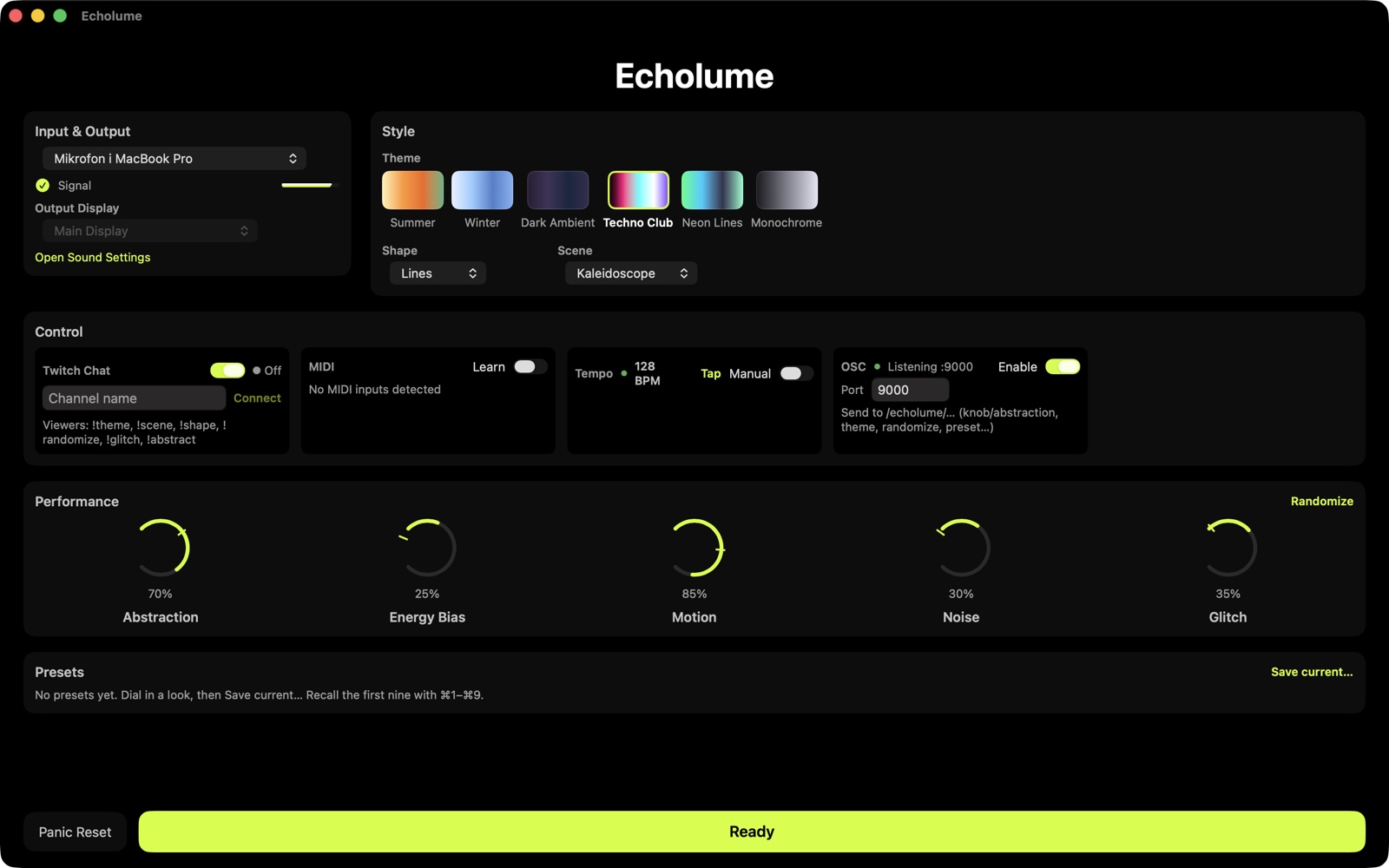 Your audio input
Themes, scenes, shapes
Twitch, MIDI & OSC
Five live knobs
One button: Ready
Your audio input
Themes, scenes, shapes
Twitch, MIDI & OSC
Five live knobs
One button: Ready
Made for producers
Drop the bundled EcholumeAudioTap plugin onto a track in Ableton Live or Logic Pro. It listens to that track and sends what it hears, along with your project's tempo, straight to Echolume.
There is no BlackHole or loopback driver to set up. Add the plugin, turn on OSC input in Echolume's Setup, and hit Ready. It stays locked to your host tempo and your audio passes through the track untouched.
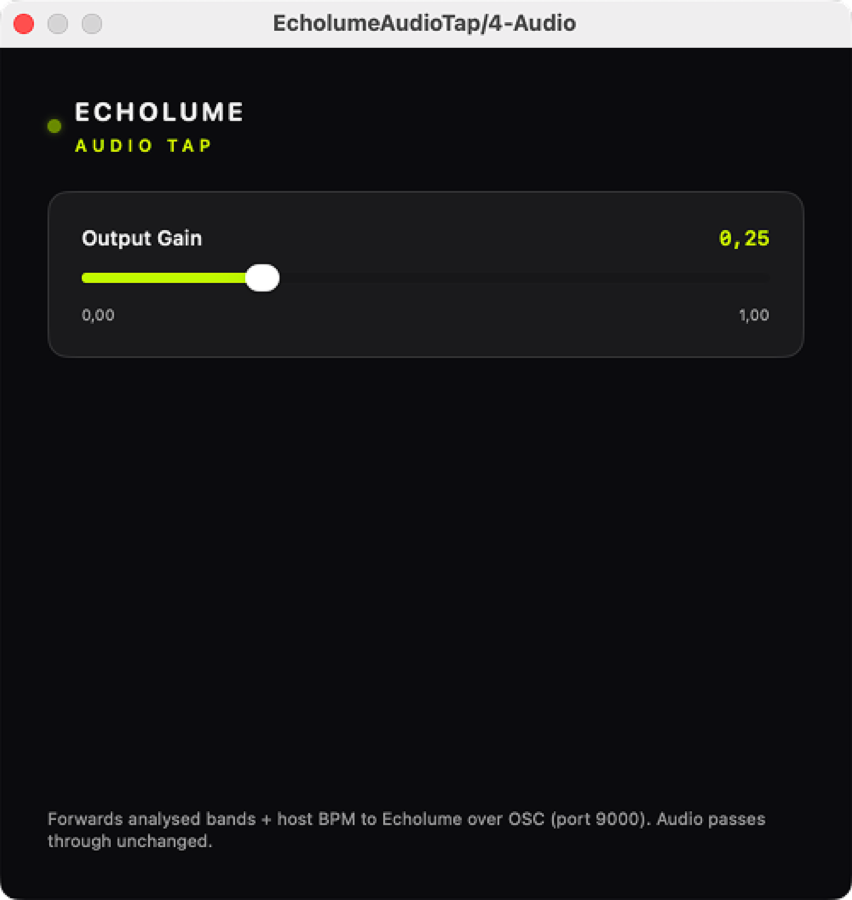
Built for performance
A microphone or an audio interface is all you need to start. The DAW plugin, a MIDI controller and Twitch are there when you want them.
-
DAW
Visuals from your DAW track
Add the bundled EcholumeAudioTap plugin to a track in Ableton Live or Logic Pro and turn on OSC input in Echolume. The visuals follow that track and your project's tempo, with no loopback driver to install.
-
Tempo
Moves on the beat
Echolume finds the tempo of whatever you play and pulses with it. If it locks onto the wrong beat, tap the tempo in by hand or from a MIDI pad. With the DAW plugin it takes your project's tempo instead.
-
Twitch
Let your chat play along
Viewers type commands in chat to switch themes and scenes, randomize the look or recall a preset. Echolume reads chat without signing in to your account, and takes one command per second.
-
Controllers
Use the gear you have
Map the five knobs and a few triggers, like Randomize and Panic Reset, to any MIDI controller with MIDI Learn. If you run TouchDesigner or Resolume, they can drive Echolume over OSC.
-
Presets
Save a look, bring it back
Save a look you like, with its theme, scene, shape and knob positions, and recall it with
⌘1to⌘9during a set or from Twitch chat. -
Output
Fullscreen on a second screen
Echolume draws on your Mac's graphics chip, so the visuals stay smooth fullscreen on a projector or an external display while the controls stay on your laptop.
-
Recording
Record your visuals
Press
Vin Live mode to record the output to an H.264 MP4 in your Movies folder. It captures the picture only, with no audio track, so pair it with your own recording of the music in an editor, or capture both together in OBS. -
Menu bar
Quick actions from the menu bar
Randomize the look, clear the trails with Panic Reset, restart audio or bring Echolume forward from the menu bar, even while it runs fullscreen on another display.
-
Audio inputs
Switch inputs mid-set
Pick any input and channel pair from inside the app. If an interface disconnects mid-set, Echolume falls back to your Mac's default input instead of stopping.
From the studio to the dancefloor
Producing at home, playing a live set, or streaming. Give your sound something to look at.



Before you buy
- What sound can Echolume react to?
- Anything that reaches your Mac as an audio input. That means the built-in microphone, an audio interface, or a track in a DAW that loads AUv3 plugins (Ableton Live 11.3 or later, or Logic Pro) through the bundled plugin with OSC input turned on. It does not listen to your Mac's output directly, so music playing in Spotify or a browser needs a loopback driver such as BlackHole. The setup guide covers each route.
- Do I need a MIDI controller?
- No. The knobs, themes and scenes all work with a mouse or trackpad, and in Live mode there are keyboard shortcuts for the things you reach for during a set. A MIDI controller is there if you want your hands on real knobs.
- Is it a subscription?
- No. Echolume is $19.99 once on the Mac App Store, with no subscription and no in-app purchases.
- Does it need an internet connection?
- No. Listening, analysis and rendering all happen on your Mac, and no audio leaves it. Only the optional Twitch chat feature connects to the internet.
- Which Macs does it run on?
- Echolume needs macOS 14 Sonoma or later.
- Can I record what it shows?
- Yes. Press
Vin Live mode to record the output to an MP4 in your Movies folder. The file has the picture only and no sound, so put it together with your music in a video editor, or capture both at once in OBS. - Does it work with OBS?
- Yes. Capture Echolume with a macOS Screen Capture source and send your music into Echolume through BlackHole or the DAW plugin. The OBS guide walks through it.
Download Echolume
Echolume runs on macOS 14 (Sonoma) or later. The bundled plugin needs a host that loads AUv3 plugins, such as Ableton Live 11.3 or later, or Logic Pro.
Download on the Mac App Store$19.99 once on the Mac App Store, no subscription, and it is yours to keep. The plugin comes inside the app and registers the first time you open Echolume.